冷静に
html
head
meta
link
scriprt
body
h1
h2
h3
h4
h5
h6
P
ul
ol
li
dl
dt
dd
img
src
width
height
table
tr
th
td
address
div
id
class
strong
em
今なら分かる。
可変レイアウト:レイアウトの設定
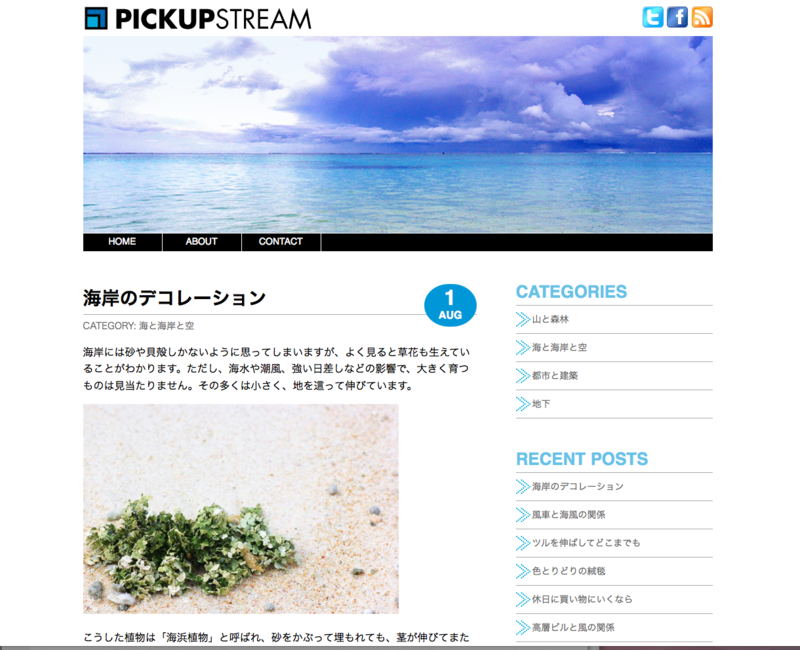
PC タブレット スマホ のサイズに対応してくれる。
すごいね〜
HTML
<!DOCTYPE HTML> <html lang="ja"> <head> <meta charset="utf-8"> <meta name="viewport" content="width=device-width"> <title>メディアクエリ</title> <link rel="stylesheet" href="style-l.css"> <link rel="stylesheet" href="style-m.css" media="only screen and (min-width:600px) and (max-width:979px)"> <link rel="stylesheet" href="style-s.css" media="only screen and (max-width:599px)"> </head> <body> <!-- ▼#container --> <div id="container"> <!-- ▼#header --> <div id="header"> <!-- ▼#site --> <div id="site"> <h1 id="rogo"><img src="img/rogo.jpg" alt="PICKUP STREAM"</h1> </div> <!-- ▲#site --> <!-- ▼#iconmenu --> <div id="iconmenu"> <ul> <li><a href="url"><img src="img/Twitter.png" alt="Twitter"></a></li> <li><a href="url"><img src="img/Facebook.png" alt="Facebook"></a></li> <li><a href="url"><img src="img/RSS.png" alt="RSS Feed"></a></li> </ul> </div> <!-- ▲#iconmenu --> <!-- ▼#headerimg--> <div id="headerimg"> <img src="img/1.jpg" alt=""> </div> <!-- ▲#headerimg --> <!-- ▼#nav--> <div id="nav"> <ul> <li><a href="#">HOME</a></li> <li><a href="#">ABOUT</a></li> <li><a href="#">CONTACT</a></li> </ul> </div> <!-- ▲#nav --> </div> <!-- ▲#header --> <!-- ▼#content --> <div id="content"> <div class="date"><span>1</span>AUG</div> <h2>海岸のデコレーション</h2> <div class="cat">CATEGORY: <a href="">海と海岸と空</a></div> <p>海岸には砂や貝殻しかないように思ってしまいますが、よく見ると草花も生えていることがわかります。ただし、海水や潮風、強い日差しなどの影響で、大きく育つものは見当たりません。その多くは小さく、地を這って伸びています。</p> <p><img src="img/a1380_000500.jpg" alt=" "></p> <p>こうした植物は「海浜植物」と呼ばれ、砂をかぶって埋もれても、茎が伸びてまた葉を出す仕組みになっています。</p> <p>ところどころに顔を出す緑色の小さな葉っぱは、海岸をかわいくデコレーションしてくれます。海への道中で踏んづけてしまう前に、足元にあるものを観察してみるのもおもしろいですよ。</p> </div> <!-- ▲#content --> <!-- ▼#sidebar --> <div id="sidebar"> <!-- ▼.menu --> <div class="menu"> <h3>CATEGORIES</h3> <ul> <li><a href="">山と森林</a></li> <li><a href="">海と海岸と空</a></li> <li><a href="">都市と建築</a></li> <li><a href="">地下</a></li> </ul> </div> <!-- ▲#menu --> <!-- ▼.menu --> <div class="menu"> <h3>RECENT POSTS</h3> <ul> <li><a href="">海岸のデコレーション</a></li> <li><a href="">風車と海風の関係</a></li> <li><a href="">ツルを伸ばしてどこまでも</a></li> <li><a href="">色とりどりの絨毯</a></li> <li><a href="">休日に買い物にいくなら</a></li> <li><a href="">高層ビルと風の関係</a></li> </ul> </div> <!-- ▲#menu --> </div> <!-- ▲#sidebar --> <!-- ▼#footer --> <div id="footer"> <p>PICKUP STREAM</p> <small>Copyright © PICKUP STREAM, all rights reserved.</small> </div> <!-- ▲#footer --> </div> <!-- ▲#container --> </body> </html>
style-l.css
/* layout */
body {
	margin: 24px 10px;
	font-family:
		'メイリオ',
		'Hiragino Kaku Gothic Pro',
		sans-serif;
}
#container {
	width: 960px;
	margin: auto;
}
#header {
	margin: 0 0 50px;
}
#content {
	width: 600px;
	float: left;
	margin: 0 0 50px;
}
#sidebar {
	width: 300px;
	float: right;
	margin: 0 0 50px;
}
#footer {
	clear: both;
}

/* site */
#site	{
	float: left;
}
#site h1 {
	margin: 0 0 0 2px;
	line-height: 1;
}

/* #iconmenu */
#iconmenu	{
	float: right;
	text-align: right;
}
#iconmenu ul {
	margin: 0;
	padding: 6px 0 0;
}
#iconmenu li {
	display: inline;
	list-style-type: none;
}
#iconmenu img	{
	border: none;
}
#iconmenu li a:hover img {
opacity:0.6;
	filter:alpha(opacity=60);
	-ms-filter: "alpha(opacity=60)";
	background:none!important;
}

/* headerimg */
#headerimg img {
	vertical-align: bottom;
}

/* nav */
#nav {
	font-family:
		'Maven Pro',
		Helvetica,
		Arial,
		sans-serif;
	font-size: 14px;
	overflow: hidden;
	border-top: solid 1px #fff;
	background-color: #000;
}
#nav ul	{
	margin: 0;
	padding: 0;
}
#nav li	{
	list-style-type: none;
	float: left;
}
#nav li a	{
	display: block;
	width: 120px;
	padding: 6px 0;
	border-right: solid 1px #fff;
	color: #fff;
	text-align: center;
	text-decoration: none;
}
#nav li a:hover	{
	background-color: #0097d8;
}

/* content */
.date	{
	float: right;
	background-color: #0097d8;
	padding: 8px 22px;
	border-radius: 55px / 48px;
	text-align: center;
	font-family:
		'Maven Pro',
		Helvetica,
		Arial,
		sans-serif;
	font-weight: bold;
	color: #ffffff;
}
.date span	{
	display: block;
	font-size: 32px;
	line-height: 1.0;
}
#content h2	{
	font-size: 28px;
	border-bottom: solid 1px #aaa;
	margin: 0 0 6px;
	padding: 0 0 3px;
}
.cat {
	font-size: 14px;
	color: #666;
}
.cat a {
	text-decoration: none;
	color: #666;
}
#content p {
	line-height: 1.6;
}

/* メニュー */
.menu	{
	margin-bottom: 50px;
}
.menu h3 {
	font-family:
		'Maven Pro',
		Helvetica,
		Arial,
		sans-serif;
	font-size: 26px;
	color: #66c1e8;
	margin: 0 0 5px;
}
.menu ul {
	margin: 0;
	padding: 0;
	border-top: solid 1px #aaa;
}

.menu li {
	margin-bottom: 0;
	list-style-type: none;
	border-bottom: solid 1px #aaa;
}
.menu li a {
	display: block;
	font-size: 14px;
	text-decoration: none;
	color: #666;
	padding: 10px 0 10px 25px;
	background-image: url(img/yajirushi.gif);
	background-repeat: no-repeat;
	background-position: 0 50%;
}
.menu li a:hover {
	background-color: #b4f0ff;
}

/* #footer */
#footer {
	font-family:
		'Maven Pro',
		Helvetica,
		Arial,
		sans-serif;
	color: #fff;
	background-color: #000;
	padding: 10px 10px 20px;
}
#footer p {
	margin: 0;
}
#footer small {
	font-size: 12px;
	font-weight: bold;
	display: block;
}style-m.css
/* layout */
#container{
	width:100%;
}
#content{
	width:62.5%;
}
#sidebar{
	width:31.25%;
}

/* image */
img	{
	max-width: 100%;
	height: auto;
}
style-s.css
/* layout */
#container {
	width: 100%;
}
#header {
	margin: 0 0 15px;
}
#content {
	width: 100%;
	float: none;
}
#sidebar {
	width: 100%;
	float: none;
}

/* image */
img	{
	max-width: 100%;
	height: auto;
}

/* iconmenu */
#container {
	position: relative;
}
#iconmenu {
	position: absolute;
	right: 8px;
	bottom: 6px;
}
#footer	{
	padding-bottom: 60px;
}
#site, #iconmenu {
	float: none;
}

/* nav */
#nav li a	{
	width: auto;
	padding: 5px 8px;
}

/* content */
.date {
	float: none;
	font-size: 12px;
	line-height: 2.5;
	display: inline;
	padding: 3px 10px;
	border-radius: 5px;
}
.date span {
	font-size: 12px;
	display: inline;
}
#content h2 {
	font-size: 24px;
}
ルート検索マップ
すごいね〜 案内が出てくる

<!DOCTYPE HTML>
<html lang="ja">
<head>
<meta charset="utf-8">
<title>Google Maps API SDK</title>
<!--[if IE]>
<script src="http://html5shiv.googlecode.com/svn/trunk/html5.js"></script>
<![endif]-->

<!-- 【1】Google Maps APIを呼び出し-->
<script type="text/javascript" src="http://maps.google.com/maps/api/js?sensor=true&language=ja"></script>

<!-- 【2】どんな地図を描くかのメイン処理 -->
<script type="text/javascript">

// ■地図初期化し表示
function initialize(position) {

// ■地図を表示する緯度経度を指定する
var latlng = new google.maps.LatLng(35.728926,139.71038)	;

  // ■地図必須プロパティを設定
  var myOptions = {

 // ■ズームレベルの指定 0〜17
    zoom: 15,

// ■地図の中心を指定(上記で設定の緯度経度latlng)
center: latlng,

 // ■地図のタイプ設定
 //  ROADMAP:デフォルト、SATELLITE:写真タイル、HYBRID:写真タイルと主要な機能、TERRAIN:物理的な起伏を示すタイル
mapTypeId: google.maps.MapTypeId.ROADMAP

 };// 地図プロパティここまで

 //ルート検索

var rendererOptions =
  {
draggable: true,
preserveViewport:false
 };
var directionsDisplay = new
 google.maps.DirectionsRenderer(rendererOptions);
 var directionsService = new google.maps.DirectionsService();
    var request =
 {
	 origin: "池袋",//出発点
	destination: "富士山",//到着点
	 travelMode: google.maps.DirectionsTravelMode.DRIVING,//運転モード
	unitSystem: google.maps.DirectionsUnitSystem.METRIC,
    optimizeWaypoints: true,
    avoidHighways: false,
    avoidTolls: false
    };
  directionsService.route(request, function(response, status)
    {
	 if (status == google.maps.DirectionsStatus.OK)
        {
        directionsDisplay.setDirections(response);
		directionsDisplay.setPanel(document.getElementById("directionsPanel"));

        }
    });
  // ■<div id="map_canvas">と結びつけて、その領域に地図を描く
	var map = new google.maps.Map(document.getElementById("map_canvas"), myOptions);
  // ルート検索地図に表示する
  directionsDisplay.setMap(map);

}//initialize()


	 </script>

 </head>
<body onload="initialize()">

<!-- 地図はここに描画される -->
<div id="map_canvas" style="width: 640px; height: 480px;"></div>
<div id="directionsPanel" style="width: 640px; height: 480px;">
</div>

</body>
</html>
RSS取得して表示
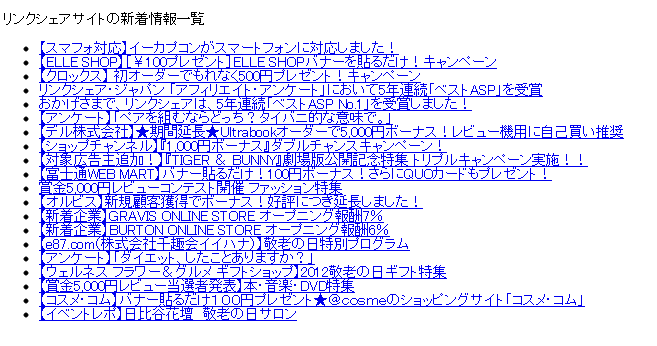
<?php
require_once("function.php");
$url="http://www.linkshare.ne.jp/index.xml";
$xml=simplexml_load_file($url);
$hits=$xml->channel->item;
?>
<!DOCTYPE html>
<html>
<head>
<meta charset="UTF-8">
<title>リンクシェアサイトの新着情報 RSS表示</title>
</head>
<body>
<p>リンクシェアサイトの新着情報一覧</p>
<ul>
<?php foreach ($hits as $hit) { ?>
<li><a href="<?php echo h($hit->link); ?>"><?php echo h($hit->title); ?></a></li>
<?php } ?>
</ul>
</body>
</html>《function.php》
<?php
//htmlspecialchars:文字列中のHTMLを無効化します
function h($str)
{
$str=htmlspecialchars($str, ENT_QUOTES);
$str=str_replace("&lt;!--","<!--",$str);
$str=str_replace("--&gt; ","-->",$str);
return $str;
}
QRコード作成サイト

<!DOCTYPE html>
<html>
<head>
<meta charset="UTF-8">
<title>QRコード作成サイト</title>
<style>
body {
  text-align: center;
}
</style>
</head>
<body>
<p>生成されたQRコード</p>
<?php
$keyword = $_GET["keyword"];
$keywordurl = urlencode($keyword);
$url="http://chart.apis.google.com/chart?chs=150x150&cht=qr&chl=$keywordurl";
?>
<img src="<?php echo $url; ?>">
</body>
</html>
《qrcode.html》
<!DOCTYPE html>
<html>
<head>
<meta charset="UTF-8">
<title>検索フォーム</title>
<style>
body {
  text-align: center;
}
</style>
</head>
<body>
<p>QRコードにしたい文字を入力してください。</p>
<form action="qrcode.php" method="get">
キーワード:<input type="text" name="keyword" size="40">
<input type="submit" value="検索">
</form>
</body>
</html>
iphoneサイト練習chapter5
本通りやったけど、呪文のよう…
右から左に流れてく感じ。理解できるのかしら?
iphoneサイト練習

<!DOCTYPE HTML> <html lang="ja"> <head> <meta charset="utf-8"> <title>エモトカホリ</title> <meta name="viewport" content="width=device-width"> <meta name="format-detection" content="telephone=no"> <link rel="apple-touch-icon" href="apple-touch-icon.png"> <link rel="stylesheet" href="css/iphone.css" media="screen"> </head> <body> <header class="global-header"> <h1 class="page-heading">エモトカホリ</h1> </header> <img src="img/logo.png" class="img-illust"/> <p class="introduction"> エモトカホリのポートフォリオサイトです。<br/> 動物や植物を中心にしたイラストを書いています。</p> <section class="block"> <h1 class="block-heading">イラスト集</h1> <p class="comment"> エモトカホリの作品集です。絵をクリックするとイラストのページに移動します。 </p> <nav class="nav-portfolio"> <ul> <li><a href="flying-penguin.html" title="ペンギン"><img src="img/thumbnail_flying-penguin.png" alt="群れをなして空を飛ぶペンギンたちのイラスト"></a></li> <li><a href="love-bluebird.html" title="コトリ"><img src="img/thumbnail_love-bluebird.png"alt="群れをなして空を飛ぶペンギンたちのイラスト"></a></li> <li><a href="dreaming-elephant.html" title="ゾウ"><img src="img/thumbnail_dreaming-elephant.png" alt="クジャクの上に乗って空を飛ぶことを夢見るゾウのイラスト"></a></li> <li><a href="star-bear.html" title="クマ"><img src="img/thumbnail_star-bear.png" alt="星を虫取りアミでたくさん捕まえているクマのイラスト"></a></li> <li><a href="present-dog.html" title="イヌ"><img src="img/thumbnail_present-dog.png"alt="プレゼントの箱を体につけたイヌのイラスト"></a></li> <li><a href="flying-cat.html" title="ネコ"><img src="img/thumbnail_flying-cat.png" alt="色とりどりの風船を持って空を飛ぶネコのイラスト"></a></li> <li><a href="rabbit.html" title="ウサギ"><img src="img/thumbnail_rabbit.png" alt="花に恋するウサギ"></a></li> <li><a href="tortoise.html" title="カメ"><img src="img/thumbnail_tortoise.png" alt="森で長生きしているカメ"></a></li> </ul> </nav> <p class="comment"> こちらで紹介している作品以外の作品もありますので、ご覧になりたい方は<a href="mailto:mail@exsample.com?subject=【エモトカホリの他の作品について】">メールでお問い合わせください。</a> </p> </section> <footer class="global-footer"> <nav class="nav-about"> <ul> <li><a href="emotokahori.html">エモトカホリの紹介</a></li> <li><a href="sales.html">イラストの販売について</a></li> <li><a href="contact.html">仕事のご依頼・お問い合わせ</a></li> </ul> </nav> <p class="copyright"><small><Copyright©2010 Emoto Kahori</small></p> </footer> <script src="js/iphone.js"></script> </body> </html>
@charset "UTF-8";
/*=================================================
 * ブラウザのデフォルトのスタイルをリセットする
 * ================================================= */

 html, body, h2, h2, h3, h4, h5, h6, ul, ol, dl, li, dt, dd, p, header, hgroup, section, article, aside, hgroup, footer, figure, figcaption, nav{
	 margin:0;
	 padding:0;
	 font-size:100%;
 }

 body{
	 line-height: 1.0;
	 -webkit-text-size-adjust:none;
 }

article,aside,canvas,details,figcaption,figure,
footer,header,hgroup,menu,nav,section,summary {
 display:block;
}

img{
	border:0;
	vertical-align:bottom;
}

ul,ol{
	list-style:none;
}

table{
	border-spacing: 0;
	empty-cells: show;
}

/*=================================================
 * サイト全体の基本スタイル
 * ================================================= */

 body{
	 background-color: #d9f5f3;
	 font-family:Helvetica;
	 font-size: 14px;
	 line-height: 1.6;
	}

 a{
	  color:#336699;
 }
 .global-header{
	 border-bottom: 1px solid #ffffff;
	 height: 44px;
	 line-height: 44px;
	 background-color:#75D9D0;
	 background-image:-webkit-gradient(linear, left top, left bottom, from(#d9f5f3), to(#75d9d0));
 }
 .page-heading {
	 margin: 0 auto;
	 width: 140px;
	 overflow: hidden;
   color: #333333;
	 font-size:16px;
	 text-align: center;
	 white-space: nowrap;
	 text-overflow:ellipsis;
	 text-shadow: 0 1px #ffffff;
 }
 .nav-page{
	 position: absolute;
	 top: 0;
	 left: 0;
	 width: 100%;
 }
 .nav-page-left{
	position: absolute;
 top: 0;
 left: 10px;
}
.nav-page a{
	padding: 6px 12px;
	border:1px solid #75d9d0;
	background-color: #d9f5f3;
	background-image:-webkit-gradient(linear, left top, left bottom, from(#d9f5f3),color-stop(45%, #c8e4e2),	 color-stop(55%,#86e0e1) ,to(#75d9d0));
	-webkit-border-radius:4px;
	border-radius:4px;
	-webkit-box-shadow: 0 1px #d9f5f3;
	box-shadow:0 1px #d9f5f3;
	text-decoration: none;
}
.introduction{
	margin: 15px 10px;
	padding: 5px 10px;
}
.block{
	padding-bottom:20px;
}
.block-heading {
	 margin: 10px;
   padding: 5px;
	 border-left: 5px solid #75D9D0;
   font-size: 14px;
}
.comment{
	margin: 0 10px;
	font-size: 12px;
}
.comment p {
 margin-top: 0;
}
.nav-portfolio {
 margin-top: 10px;
}
.nav-portfolio img {
 margin-bottom: 6px;
 width: 60px;
 height: 60px;
 -webkit-border-radius: 30px;
 border-radius: 30px;
 -webkit-box-shadow: 0 0 3px #333333;
 box-shadow: 0 0 3px #333333;
}
.nav-portfolio li {
	margin: 0 0 10px 16px;
	float: left;
	text-align: center;
}
.nav-portfolio ul:after {
	content: '';
	display: block;
  clear: both;
 }
 .nav-portfolio a{
	 display: block;
	 text-decoration: none;
}
.nav-portfolio a:after {
 display: block;
 content: attr(title);
 font-size: 12px;
 width: 60px;
 text-align: center;
 white-space: nowrap;
 text-overflow: ellipsis;
}
.img-illust {
 margin: 0 auto;
 display: block;
 border: 10px solid #F5F5F0;
}
.nav-about {
 margin: 10px;
}
.nav-about ul {
 -webkit-border-radius: 8px;
 border-radius: 8px;
 -webkit-box-shadow: 0 0 3px #333333;
 box-shadow: 0 0 3px #333333;
}
.nav-about li {
 border-top: 1px solid #D9F5F3;
 border-bottom: 1px solid #75D9D0;
 height: 44px;
 line-height: 44px;
 background-color: #ffffff;
}
.nav-about li:first-child {
 -webkit-border-top-right-radius: 8px;
 -webkit-border-top-left-radius: 8px;
 border-top-right-radius: 8px;
 border-top-left-radius: 8px;
}
.nav-about li:last-child {
 -webkit-border-bottom-left-radius: 8px;
 -webkit-border-bottom-right-radius: 8px;
 border-bottom-right-radius: 8px;
 border-bottom-left-radius: 8px;
}
.nav-about a {
 padding: 0 14px;
 display: block;
 text-decoration: none;
 overflow: hidden;
 white-space: nowrap;
 text-overflow: ellipsis;
}
.global-footer {
 padding: 10px 0;
 background-color: #75D9D0;
}
.copyright {
 margin: 0;
 color:  #ffffff;
 text-align: center;
}
